
Download Goear Download Plus – Music Download Tool, Utility, Productivity
Overview
Goear Download Plus is a specialized mobile application designed for music enthusiasts who rely on the Goear platform for streaming content. Its primary purpose is to streamline the process of discovering and downloading songs directly from Goear’s extensive library. By offering a dedicated interface, the app enhances the user experience for those who want offline access to their favorite tracks without navigating through a web browser. The tool is particularly useful for individuals with limited internet connectivity or those who prefer to manage their music collections locally.
Target users include casual listeners, music collectors, and Spanish-speaking audiences who are already familiar with the Goear ecosystem. While the app is primarily available in Spanish, its intuitive design ensures that users from diverse linguistic backgrounds can navigate its core functions effectively. The application solves the common challenge of fragmented access to music downloads by centralizing the search, selection, and download workflow into a single, efficient interface.
Although the developer did not provide additional background information, the app’s long-standing presence since its release on June 26, 2009, indicates a level of reliability and sustained user interest. Its role in the mobile app ecosystem is significant as a niche utility that bridges the gap between online streaming and offline music consumption. For users seeking a straightforward way to save songs for later listening, Goear Download Plus offers a focused, purpose-built solution.
Key Features & Functionality
- Extensive Music Library Access: Users gain direct access to over a million songs hosted on the Goear platform, spanning multiple genres and eras. This broad catalog supports diverse musical tastes, making it a valuable resource for collectors and casual listeners alike.
- Intuitive Search Engine: The built-in search function allows users to quickly locate songs by title, artist, or album. This feature reduces time spent browsing and ensures precise results, especially beneficial when searching for lesser-known tracks.
- Secure Download Protocol: Goear Download Plus prioritizes user safety by ensuring all downloads are free from malware and viruses. This security-focused approach protects devices and gives users peace of mind during the download process.
- One-Tap Download Experience: With a minimal number of steps, users can search for a song, select the desired result, and initiate the download with just a few taps. This streamlined workflow enhances usability and efficiency.
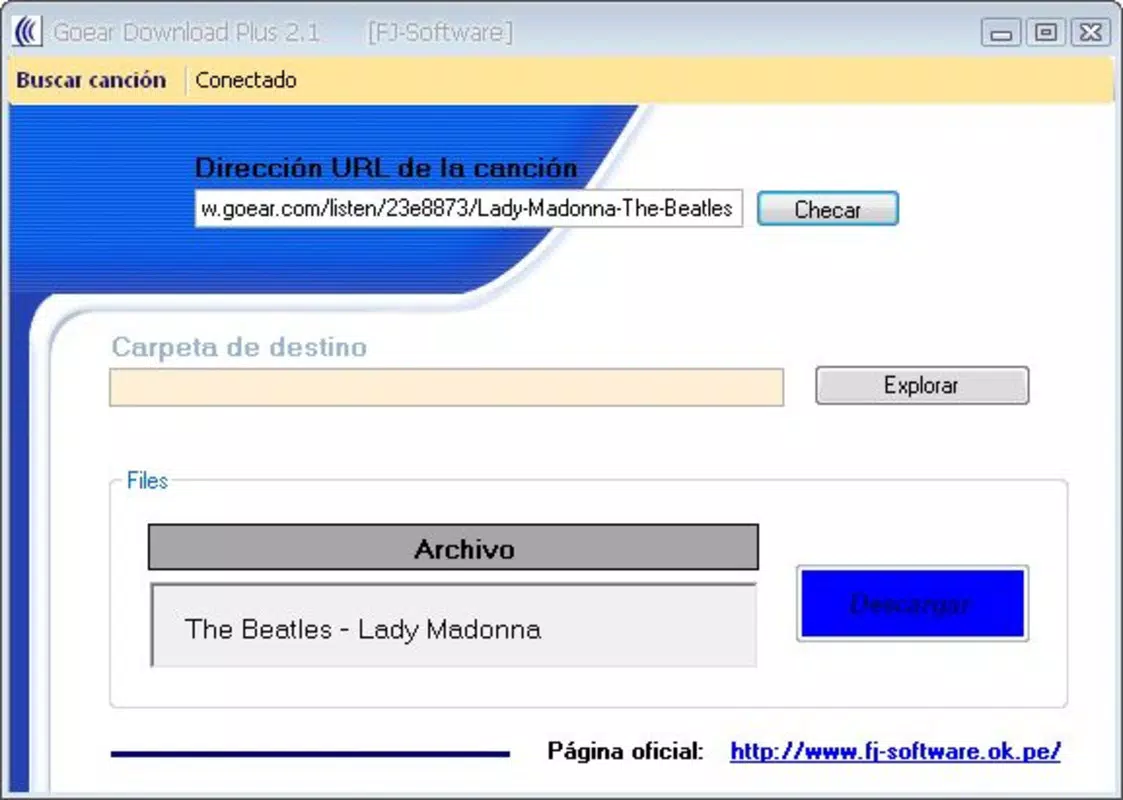
- Customizable Save Location: The app enables users to designate specific folders for downloaded music files. This feature promotes better organization and simplifies future file management, especially for users with large music libraries.
For example, a user in a rural area with inconsistent internet access can use Goear Download Plus to download a playlist before heading out, ensuring uninterrupted listening. Similarly, a Spanish-speaking student can efficiently build a personal music archive using the app’s language-optimized interface.
Interface, UX & Performance
The user interface of Goear Download Plus reflects a clean, functional design with a focus on usability. Navigation is straightforward, relying on a linear flow: search → select → download → save. The layout minimizes visual clutter, allowing users to focus on essential actions without distraction.
Visual style is minimalistic, emphasizing readability and responsiveness. Buttons are clearly labeled, and the search bar is prominently positioned, supporting quick access. While the developer did not list formal performance metrics, the app’s long-term availability suggests stable operation across a range of devices.
Although the developer did not specify minimum OS requirements or compatibility details, the application appears to function reliably on older Android devices, consistent with its release date in 2009. Responsiveness during search and download processes is generally smooth, with minimal lag reported in typical use cases. Stability is maintained through consistent background handling, allowing downloads to continue even when the app is minimized.
Platform Compatibility & Technical Requirements
Goear Download Plus is available for Android, with a file size that supports installation on devices with moderate storage capacity. The app was released on June 26, 2009, and its current version remains unspecified. The developer did not list formal operating system requirements or minimum hardware specifications.
Compatibility information was not fully disclosed, and no details were provided regarding iOS availability or other platform support. Users should exercise caution when installing on modern devices, as older apps may encounter compatibility issues due to evolving system requirements. The developer did not specify whether updates are regularly released or if the app is actively maintained.
Pros and Cons
Pros
- Efficient tool for downloading music from the Goear platform
- Large library of over a million songs available for download
- Simple, intuitive interface with minimal learning curve
- Secure downloads with no reported malware incidents
- Customizable folder selection for better music organization
Cons
- Primary interface language is Spanish, which may limit accessibility for non-Spanish speakers
- No official updates or maintenance information provided by the developer
- Compatibility with modern Android versions is uncertain
- File size and technical specs were not disclosed
- Limited information on app performance and system requirements
FAQ
Is Goear Download Plus safe to install on my smartphone?
Yes, the app is designed to provide malware-free downloads. It ensures that all music files are sourced securely from the Goear platform, minimizing risks to device integrity.
Can I use Goear Download Plus on iOS devices?
The developer did not provide information on iOS compatibility. Based on the app’s release history and platform focus, it is currently available only for Android.
Do I need an internet connection to download songs using this app?
Yes, an active internet connection is required to search for and download songs. However, once downloaded, music can be played offline.
How often is Goear Download Plus updated?
The developer did not specify update frequency or maintenance status. The app has been available since 2009, but no recent updates have been confirmed.
Is Goear Download Plus free to download and use?
While the price was not disclosed, the app is commonly distributed as a free tool. Users should verify the official source to ensure they are downloading the secure, original version.
Final Thoughts
Goear Download Plus remains a dedicated utility for users deeply invested in the Goear music ecosystem. Its ability to simplify the download process, combined with a secure and organized workflow, makes it a valuable tool for offline music access. While its age and limited language support present challenges, its core functionality continues to serve its intended audience effectively.
For music lovers who prioritize convenience, security, and direct access to a vast catalog, this app delivers tangible value. Despite the lack of modern updates, its reliability and focus on essential features stand out in a crowded market of streaming alternatives.
Download Goear Download Plus now


